
Portfolio project
Streamlining certification reminders and recognition certificates
What we delivered
The team built an Excel/VBA workbook for certification renewal follow-up and a separate Excel-to-Illustrator workflow for personalized recognition certificates.
- Context
- Renewal follow-up and quarterly recognition for coding teams
- My responsibility
- Workflow design with the team
- Status
- Reminder workbook and certificate workflow developed
- Focus
- Excel/VBA reminders and Illustrator certificate production
Overview
Our team worked on two recurring communications workflows for medical coding teams. One supported follow-up on professional certification renewals. The other helped prepare personalized certificates for quarterly quality recognition.
Preparing renewal reminders
The Excel/VBA workbook organized employee and certification information and maintained separate workflows for two certification bodies. It supported identifying records that needed follow-up and preparing renewal communications based on the relevant certification information.
Producing recognition certificates
For quarterly recognition, we used a separate Excel-to-Illustrator workflow. Structured recipient information provided the variable content, and the Illustrator template supplied the reusable design. That let the team prepare personalized certificates from a consistent layout.
How the review differs
For renewal communications, the important checks are the certification details and who needs a reminder. For recognition, the review focuses on matching each recipient to the right award details and checking the rendered certificate. Those are different checks even though both workflows reuse structured information.
The workbook supported the renewal process by bringing the credential, expiry date, and follow-up decision into one review. The recognition process used a different handoff: prepare the recipient data in Excel, populate the Illustrator layout, and review the rendered certificate. Keeping a review point in each workflow helped the team catch errors that mattered to the output, such as a wrong expiry date or a recipient name that wrapped poorly.
Two examples from the workflow
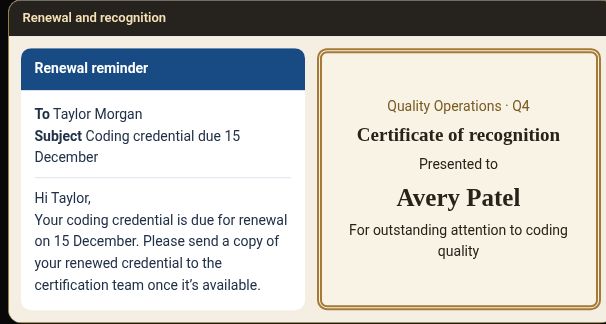
For a renewal reminder, the team would review Taylor Morgan’s fictional record in the workbook, check the certification body and expiry date, and confirm that the record needs follow-up. The reminder would then use the verified date and give Taylor a clear next action.
For quarterly recognition, the team would enter Avery Patel’s fictional name, recognition period, and award details in the source sheet. Illustrator would populate those fields in the reusable certificate design. The reviewer would then check the spelling, award wording, and how the personalized text fits before sharing the certificate.
My role and what the team delivered
I worked with the team on using reusable templates and structured records to support these recurring tasks. The work produced a workbook to support certification follow-up and a repeatable process for preparing recognition certificates.
Topics · Workflow Automation · Excel VBA · Recognition Communications